Personal

Your own machines, from wherever you are.

The desktop at home while you're not. The laptop you left at the office. Your parents' computer, when they ring on a Sunday and the printer has stopped again. One account, a short list of machines, and a connection that nobody else can start.

Free to self-host, for ever · no licence key · no seat count · no licence server to call

TZX Desk — client
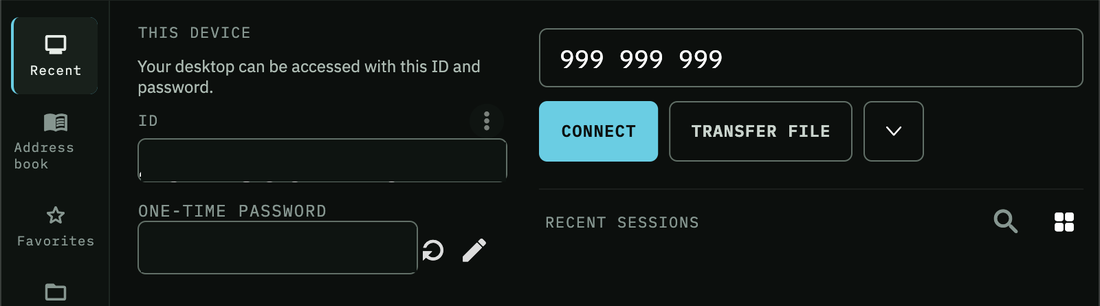
The TZX Desk client. On the left, a This Device panel showing the machine's own ID and a one-time password. On the right, a field holding a nine-digit device ID with Connect and Transfer File buttons, and a Recent Sessions list.
Your machine's own ID and one-time password on the left; the machine you're reaching for on the right.

Three steps, then it's just there

Installing the software on a machine does not make that machine reachable. That's the whole idea.

  1. Install it where you want to arrive

    On the computer you'll be connecting to. It comes up with its own ID and a one-time password, and reports in as pending — present, but not yet reachable by anyone, including you.

  2. Approve it, once

    Your console lists your devices a line each, with a state you control. Approve it and it's yours. Revoke it later and it stops answering — the refusal happens at the server, so it doesn't depend on that machine co-operating.

  3. Connect from anywhere

    Type the ID. If both ends can see each other, the session goes straight across between the two machines. If they can't — hotel Wi-Fi, mobile data, a strict office firewall — a relay carries it instead.

Two ways to not worry about it

Either we hold the account and you hold the approvals, or you hold all of it and we never see a thing.

Hosted by us

You still hold the gate

We run the server so you don't have to think about certificates or updates. What we run is a switchboard, not a window.

  • Nothing is reachable until you approve it
  • Sessions go device-to-device where the network allows
  • The relay carries traffic it cannot read
  • TOTP two-factor on your account, from any authenticator app

What the console stores

Self-hosted

Or don't have an account with anyone

Run the whole thing yourself, on a spare machine at home or the cheapest VPS you can find. This is the same software we host — not a crippled community edition.

  • Three services — console, rendezvous, relay — one compose file
  • AGPL-3.0: the code you run is code you can read
  • No device limit, no seat count, no licence check
  • If we vanished tomorrow it would carry on working

Licences & source

What's in it

The things you'd actually use on your own machines, without a Pro tier standing in front of them.

  • Address book and favourites

    The machines you use often, saved with names that mean something to you, instead of retyping nine digits.

  • File transfer

    Move a file between the two machines during a session, without posting it through a third service to get it there.

  • Direct peer-to-peer

    When both ends can reach each other, the session goes straight across. The relay is a fallback for when they can't, not the default path.

  • One-time passwords

    A fresh password per session on the machine being reached — useful when you're the one talking somebody else through it on the phone.

  • Approve and revoke

    Every device has a state you set: pending, approved, revoked. Revoking is enforced at the server, not requested politely from the device.

  • Two-factor that isn't an upsell

    TOTP on your console account with any authenticator app. A correct code never substitutes for the password — it's asked for in addition.

Outgrown five devices?

Personal stops at five. If you're still the only person using it but you look after far more machines than that — a lab, a workshop, a family's worth of computers, a side business — the step up is Solo: the same single account with no device limit, plus deploy tokens, strategies and the audit log, for $7 a month. It is deliberately self-serve, with no support. See all four plans

Two things it won't do

Better you find out here than after an hour of trying.

You can't share an iPhone or iPad screen

You can connect from one to a computer, but iOS does not let an app hand its screen to a third party in the background. That's an Apple platform rule, not something we can engineer around, and anyone telling you otherwise is describing a different arrangement than the one you think you're buying.

Our builds aren't code-signed yet

Windows SmartScreen will warn about them and macOS Gatekeeper will block them outright until the certificates are bought and the builds are signed. Until then we hand builds over ourselves and walk you through the first install — which is why this page has a form on it and not a download button.

Request access

Tell us which machines you're trying to reach and we'll get you a build that works, plus a straight answer about whether this is the right tool for it.

We reply to every one, usually the same day.

No form backend yet — sending opens your mail app with the details filled in.
Prefer to write it yourself? hello@tzxdesk.com